Toll Free: (877) 723-1442 U.S. and Canada
Xtreme CommandBars
Product Information
Product Bundles
Individual Products
More Information
Corporate Partners
Customer Spotlight
Contact Sales

Call center available M-F 9:00 - 6:00 US Eastern Time.

U.S. and Canada
(877) 723-1442

International
(517) 625-5729

Email

Win64 Ready

Win64 Ready!

Overview  |   First  |  Previous  |   Next  |  Last

Command Bar Split Button Popup Control

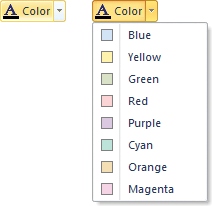
Xtreme CommandBars allows you to easily add a Split Button Popup control to your command bar.  The Split Button Popup control allows you to add a group of controls that will be displayed when the arrow button is clicked.  Once a control is selected from the drop-down list, you can simply click on the button half of the Split Button Popup to execute the code for the selected control.  The Split Button Popup control can also be used to display a tear-off popup or tear-off toolbar.  The Split Button Popup is automatically themed to match the currently set Command Bar theme.

Split Button Popup menu displayed when the arrow is clicked

The button half will execute the code for the control selected from the drop-down menu when clicked.

Microsoft, Visual Studio, and the Visual Studio logo are trademarks or registered trademarks of Microsoft Corporation in the United States and/or other countries. Other products and/or company names may be trademarks or registered trademarks of their respective owners.