Toll Free: (877) 723-1442 U.S. and Canada
Xtreme CommandBars
Product Information
Product Bundles
Individual Products
More Information
Corporate Partners
Customer Spotlight
Contact Sales

Call center available M-F 9:00 - 6:00 US Eastern Time.

U.S. and Canada
(877) 723-1442

International
(517) 625-5729

Email

Win64 Ready

Win64 Ready!

Overview  |   First  |  Previous  |   Next  |  Last

Custom Status Bar

Xtreme CommandBars comes with a built-in custom status bar.  You have the ability to add panes to the custom status bar, and can access each individual pane to change the message that is displayed.  The custom status bar will automatically use the current Command Bar theme.  For example, if you have the Command Bar theme set to Office 2003, the custom status bar will automatically use the Office 2003 theme.  The custom status bar uses the DescriptionText property of your Command Bar controls to display text in the "Idle Text" pane when the mouse is positioned over a Command Bar control simply by adding a pane with Id zero.  The custom status bar can be used to display other useful information such as Caps Lock, Scroll Lock, and Num Lock just by assigning the correct indicator to the status bar pane.
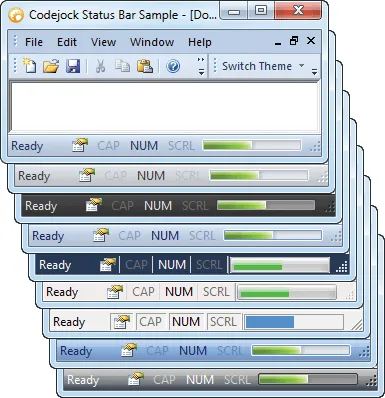
The Xtreme CommandBars custom status bar automatically uses the currently selected theme

Microsoft, Visual Studio, and the Visual Studio logo are trademarks or registered trademarks of Microsoft Corporation in the United States and/or other countries. Other products and/or company names may be trademarks or registered trademarks of their respective owners.