Toll Free: (877) 723-1442 U.S. and Canada
Xtreme TaskPanel
Product Information
Product Bundles
Individual Products
More Information
Corporate Partners
Customer Spotlight
Contact Sales

Call center available M-F 9:00 - 6:00 US Eastern Time.

U.S. and Canada
(877) 723-1442

International
(517) 625-5729

Email

Win64 Ready

Win64 Ready!

Overview  |   First  |  Previous  |   Next  |  Last

Toolbox Hot Tracking

Xtreme TaskPanel's Toolbox and TaskPanel control allows you to easily add hot tracking.  When you move the mouse cursor over your items, they will become "Hot" when Hot Tracking is enabled.  This allows you to easily see which item the mouse cursor is over.  There are 4 different styles of hot tracking to choose from, which are, Text and Image, Text Only, Image Only, and None.

Text and Image Style
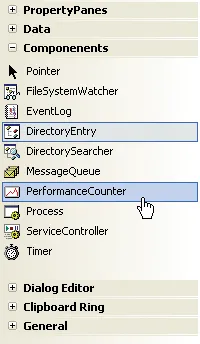
Text Style

Image Style

No HotTracking Style

Microsoft, Visual Studio, and the Visual Studio logo are trademarks or registered trademarks of Microsoft Corporation in the United States and/or other countries. Other products and/or company names may be trademarks or registered trademarks of their respective owners.