
Toolkit Pro ( for Visual C++ MFC )
Below you will find product descriptions, screenshots, boxshots and logos that you can use for your web or print catalog needs. If there is a particular style or format that you need not listed below, please feel free to contact us with your request.

Short Description (98 Words)
Toolkit Pro for Visual C++ MFC provides Windows developers with a sophisticated set of components to give applications a professional, modern appearance. Toolkit Pro combines nine of our most popular components, Command Bars, Docking Pane, Property Grid, Grid Control, Calendar, Task Panel, Shortcut Bar, Controls, Syntax Edit and Skin Framework. With Toolkit Pro you can create powerful enterprise class applications that incorporate a full set of highly customizable user interface components that include Microsoft® Office style toolbars and menus. Several popular visual styles are included such as Microsoft® Office and Visual Studio.
Long Description (737 Words)
Toolkit Pro provides Windows developers with a sophisticated set of components to give applications a professional, modern appearance. The toolkit combines all of the features of Codejock Software's Command Bars, Docking Pane, Property Grid, Grid Control, Calendar, Task Panel, Shortcut Bar, Controls, Syntax Edit and Skin Framework, all for one great price.
With the components included in Toolkit Pro you can create fully customizable menus and toolbars. Toolbars and menus can apply one of many predefined themes such as Office or Visual Studio. Using the OneNote style tabbed interface lets users easily navigate and group multiple open windows.
Visual Studio style docking and nested grouping is effortless with the Docking Pane control. Docking Pane includes many predefined themes such as Visio, Office and Visual Studio. When workspace utilization is important, use sliding auto-hide windows, nested grouping, and pinnable floating auto-hide panes to efficiently organize your application's workspace.
Property Grid provides a quick and efficient way to display and retrieve information to and from the user. Included with the Property Grid is an integrated toolbar, help panel, and Visual Studio style verb panel. The grid can accommodate almost any data type with multi-line and variable cell height support.
The Outlook style Grid Control provides functionality to easily create, group, and sort data in a flat or hierarchical format.
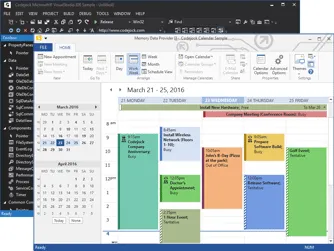
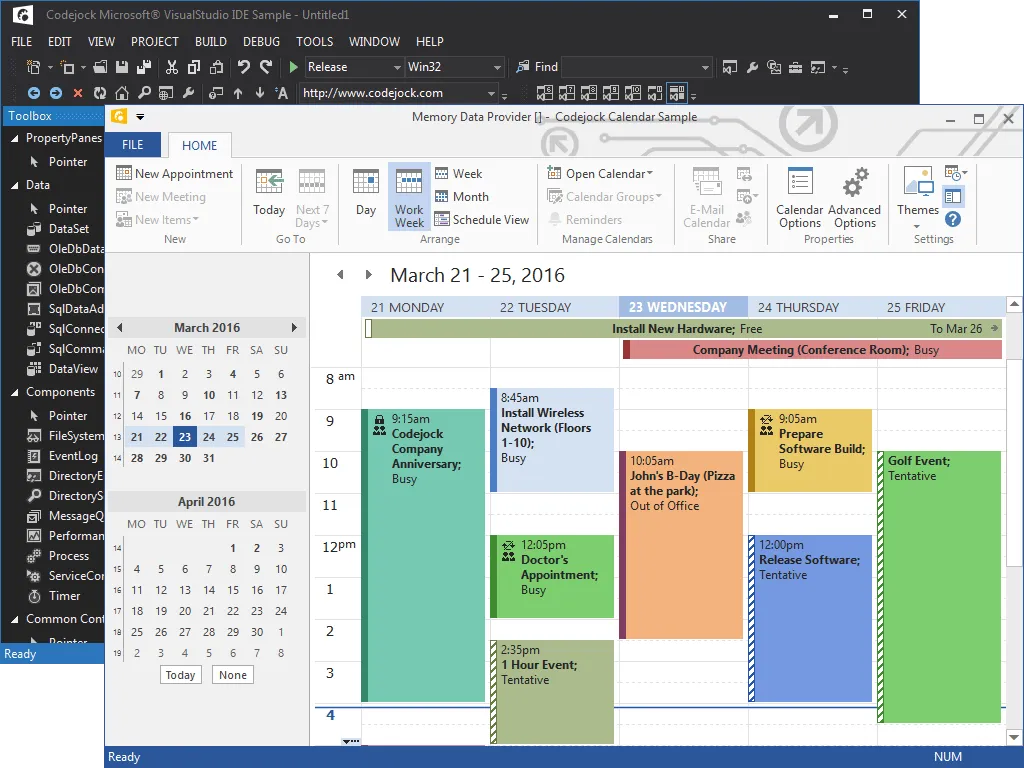
Managing appointments is fast and easy with Calendar. Calendar allows appointments to be arranged by day, week, work week, or month. Multiple user schedules can be view in a convenient side-by-side layout to quickly compare appointments. Reminders make it easy to alert users when an appointment in the Calendar is approaching or is past due. Custom print support allows the Calendar to be printed in several different ways.
All of the colors, fonts, and text used in the calendar can now be customized. This allows you to customize each and every part of the calendar. You can now create a completely custom theme using the exact colors you need. Since you can change all text drawn by the calendar you can modify the format or text to look and say exactly what you want it to.
Custom calendar appointment icon support allows you to override the standard occurrence, recurrence, private, meeting, and exception icons displayed in appointments and you can add your own additional icons.
With the Office style Ribbon Bar component users will no longer need to fumble through confusing and boring menus. Ribbon Bar includes enhanced navigation capabilities by grouping menu and toolbar commands into logical blocks that are arranged in tabular format. The Ribbon Bar includes the Office Luna (blue), Obsidian (black) and Aqua themes.
The Office style gallery control can be used in and toolbar, ribbon group, or popup menu. The gallery control displays a collection of picture or text items that can be scrolled and displayed in your popup menu, standard toolbar, or ribbon group. For example, a gallery can be used to create an Office font or size popup drop-down menu and popup color selector.
Both the Ribbon and Commandbars use Office style animation and fade effects when displaying popup menus, on mouse over, checking and un-checking items, scrollbar effects, and transitions between ribbon groups.
Skin Framework is a highly sophisticated application skinning framework technology that was developed with Windows Themes (Visual Styles) in mind. Achieving a completely themed application can be accomplished with only a few lines of code. Skin Framework provides maximum compatibility with existing Windows XP and higher Visual Styles that can be used on any Windows platform. Several predefined Visual Styles are provided, including Office, Windows XP Royale Blue, and Windows XP Luna style.
Controls provides many useful controls such as ToolTip Windows, Flicker-free Drawing and Animation, Window Shadow Manager, Shortcut Controls, Caption Control, Tip of the Day Dialog, Enhanced Multi-Selection Tree Control, Color Picker Control, Themed Buttons, Hyperlink Control, Enhanced Splitter Window, System Tray Icon Control, Font Selection and Auto-Complete Combo Box Controls, Browse Edit Control, Browse for Folder Dialog, Hex Edit Control, Masked Edit Control, Resizable Layout Manager, MDI Windows Manager, Popup Control, MDI Tab View Control, and a Custom List Control.
All components support Alpha Icons and can easily be used in any of the components included in Toolkit Pro.
All components included with Toolkit Pro make application localization quick and painless permitting you to support up to 32 different languages including Right-to-Left (RTL) languages.
Product Features


Supported Platforms and Environments
Broad compatibility across Visual Studio, Windows desktop, and Windows Server releases — from modern environments to legacy deployments.
Development Platform
Development environments
- Visual Studio 2022 (VC++ 17.0)
- Visual Studio 2019 (VC++ 16.0)
- Visual Studio 2017 (VC++ 15.0)
- Visual Studio 2015 (VC++ 14.0)
- Visual Studio 2013 (VC++ 12.0)
- Visual Studio 2012 (VC++ 11.0)
- Visual Studio 2010 (VC++ 10.0)
- Visual Studio 2008 (VC++ 9.0)
- Visual Studio 2005 (VC++ 8.0)
- Visual Studio .NET 2003 (VC++ 7.1)
- Visual Studio .NET 2002 (VC++ 7.0)
- Visual Studio 6.0 (VC++ 6.0)
Windows Desktop
Client operating systems
- Windows 11
- Windows 10
- Windows 8.1
- Windows 8
- Windows 7
- Windows Vista
- Windows XP
- Windows Me
- Windows 2000
- Windows 98 SE
- Windows 98
- Windows 95
Windows Server
Server environments
- Windows Server 2022
- Windows Server 2019
- Windows Server 2016
- Windows Server 2012 R2
- Windows Server 2012
- Windows Server 2008 R2
- Windows Server 2008
- Windows Server 2003 R2
- Windows Server 2003
- Windows 2000
- Windows NT 4.0
Minimum Requirement
Baseline development and runtime support
- Compiler: Visual C++ 6.0
- Runtime: Windows 95 / NT 4.0