
Call Us Today: (989) 472-4761
Guides & Tutorials
Guides and Tutorials
Making a Group Special
You can designate a task panel group as "special." Groups marked as special will be displayed differently than normal groups drawing the users attention to that particular group. This is an excellent way to show the user the "default" or important items.
| Special group | Normal group |
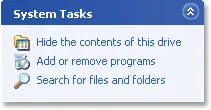 |
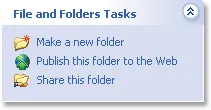 |
To set a group as special all you need to do is set the Special property to True.
Dim Group As TaskPanelGroup
Set Group = wndTaskPanel.Groups.Add(0, "System Tasks")
Group.Special = True
Support Links
User Comments
No comments yet, sign in to comment.